Closing the Agent Loop: Autonomous React Native Bug Reproduction with Argent
 Mateusz Rajski•Jul 3, 2026•9 min read
Context switching kills productivity. When my backlog fills with small UI issues or crashes, the manual friction of setting up simulators, handling authentication flows, and clicking through reproduction steps often pulls me away from more demanding work.
At the same time, these issues rarely require deep architectural thinking. Before I can fix them, I first need to reproduce them. That usually means reading the issue, preparing the environment, logging into the app, following a specific user flow, and collecting enough evidence to understand what actually happened.
After spending more time with Argent, I started wondering how far I could push this workflow. Could I hand over the entire reproduction process to an AI agent? Could a model equipped with simulator control, access to application logs, and the ability to authenticate itself reliably reproduce an issue without my involvement?
More importantly, could it prove that it succeeded?
I decided to find out.
Set the bar for full autonomous AI agent execution
Before running the experiment, I defined a few requirements.
The agent had to reproduce the issue without manual intervention, satisfy all conditions described in the issue, handle authentication on its own, and explore the application whenever the issue description omitted navigation details.
Most importantly, it had to prove its conclusion.
Reproducing a bug is only useful if the result can be verified afterwards. If the agent claimed that it successfully reproduced the issue, I wanted screenshots, logs, and a concise report explaining what happened. Otherwise, I would still need to review the entire session myself.
My goal was simple: I wanted to come back to a report that clearly answered two questions:
Was the issue reproduced?
What evidence supports that conclusion?
Let the Argent reproduce a real GitHub issue
To validate the setup, I ran Argent on a real issue from a large open source React Native application using Claude Code and Opus 4.8. I didn’t add any extra steps during setup.
The only input was the instruction below, which included the GitHub issue URL:

Read GitHub issue https://github.com/Expensify/App/issues/90313 and prepare an
 end-to-end reproduction on the active iOS simulator (the app is already installed and
 opened). Use Argent to control the iOS Simulator. Work autonomously and set up the app
 yourself using my email mateusz.argent.automation@gmail.com.
To retrieve the magic code during sign in, run:
   ~/.claude/tools/expensify-otp/get-expensify-code.sh
It prints the latest 6-digit code to stdout.

 BEFORE you start interacting with the app:
 - Extract a checklist of ALL reproduction requirements from the ENTIRE issue, not only
   the numbered steps: pre-conditions, action performed, expected and actual result,
   platforms, and any environment-specific requirements.
 - Mark each requirement as MUST or ALTERNATIVE (OR). For OR conditions, state which
   branch you will satisfy and why.
 - Turn every requirement into an explicit, visible item in your task list, including
   preconditions stated only in the description rather than in the numbered steps.
   Never leave a precondition implicit.
 Then execute the reproduction. Ensure that all reproduction requirements and
 conditions are met, including any preconditions and environment-specific requirements.
 Every precondition must have supporting evidence in the final report (screenshot, log,
 or UI state) proving it was satisfied.
 At the end of the execution, you MUST generate a Markdown file containing the
 reproduction report, named:
   reproduction-report-{issue-number}.md
 The report must be self-contained and should not require replaying the full session to
 understand the outcome. It must include:
 - Whether the issue was successfully reproduced (clear yes/no)
 - A short description of the final application state
 - Key evidence supporting the conclusion (logs, UI behavior, screenshots if available)
 - Which OR branch and environment conditions you chose, plus any deviations,
   uncertainties, or assumptions made during reproduction
 The report should be optimized for later review and verification, not for step-by-step
 tracing of the execution.
The prompt is intentionally detailed to ensure a consistent report format across sessions. Additionally, it is optimized for the issue template used in this repository, enabling reliable extraction of reproduction steps and preconditions, which are often defined implicitly rather than explicitly in issue descriptions. Empirically, previous agents in my earlier sessions have struggled with correctly identifying these implicit conditions.
While some aspects of the prompt remain open to interpretation, the most critical requirements are explicitly defined.
Security considerations
Reading magic codes from email is much easier with a Gmail connector, but anything the model reads from an inbox is untrusted input. Email can be spoofed, so there's a risk of prompt-injection attacks. And since Gmail MCP commands return free-form email content, there's no reliable way to fully sanitize that output before it reaches the model. That's why I chose to call the Gmail API directly instead, wrapped in a small script (get-expensify-code.sh) that extracts the code with a regex and prints only the six digits. The model never sees the raw email body, so the injection surface is gone. If you'd rather use a Gmail connector on your main inbox, remember to limit what the model can access. For example, a PreToolUse hook that only allows Gmail calls targeting specific allow-listed senders and blocks everything else. But again, it does not protect against prompt injection.
Execution
From that point on, the agent took over the execution.
The agent completes the login flow using the provided email address. After requesting a magic code, it retrieves the code through the Gmail API and successfully authenticates.
The recording shows the navigation process used to locate the relevant workspace and expense reports. One particularly interesting moment occurs when an incorrect navigation path is briefly explored before being recognized as irrelevant to the issue. After a short detour, the model successfully returns to the correct path and continues the investigation without external guidance.
The reproduction attempt focuses on reordering waypoints within the distance expense editor. This was the step I was most concerned about beforehand, as drag-and-drop interactions require significantly more precision than ordinary navigation or form input. The interaction was nevertheless completed successfully, revealing the reported behavior.
Agent’s report analysis
During the debugging session, the agent was building a report with evidence of its actions and the application state it observed along the way.
This report becomes the main artifact I use to evaluate the run. I do not replay the execution or inspect the simulator session. I read the report as a standalone source of truth.
The first thing I look for is a clear and unambiguous verdict on whether the issue was reproduced. This section acts as the final decision point of the run.
Everything else in the report is there to support that conclusion.
1. Verification of reproduction outcome
The report answers this directly in the Verdict section and supports it with both UI level and runtime level signals.
## Verdict

### ✅ YES — the issue was successfully reproduced.

Both documented failure modes were observed on the iOS native app:

1. **Step 5:** When dragging the second waypoint toward the third position, **all three waypoints become highlighted/selected simultaneously and the dragged waypoint cannot be moved** (the list order is unchanged after the drag).
2. **Step 6 (native only):** When dragging the third waypoint toward the first position, **the third waypoint overlaps the second** — the waypoint rows render corrupted, with two street names visibly superimposed in a single row.

A supporting **React runtime warning** was also surfaced in the waypoint editor that explains the root cause:

> `Encountered two children with the same key, `.$waypoint2`. Keys should be unique so that components maintain their identity across updates. Non-unique keys may cause children to be duplicated and/or omitted — the behavior is unsupported and could change in a future version.`

Duplicate list keys (`waypoint2`) cause React to lose per-row identity, which is consistent with multiple rows being selected at once and with rows overlapping during drag-reorder.
2. Traceability between requirements and execution
A separate part of the report focuses on traceability between the issue description and the observed execution.
Each precondition is explicitly checked and linked to evidence. This creates a direct mapping between the written issue and the actual runtime behavior.
Below are selected rows from the report illustrating this mapping in practice:
| # | Requirement | MUST / OR | Status | Evidence |
|---|-------------|-----------|--------|----------|
| P1 | Signed in to Expensify (test account) | MUST | ✅ | Magic-code sign-in with get-expensify-code.sh) |
| ... | ... | ... | ... | ... |
| P3 | Two distance expenses in separate reports | MUST | ✅ | 01-two-separate-reports.png, 03-workspace-chat-two-distance-reports.png |
| P4 | Each expense has ≥ 3 waypoints | MUST | ✅ | 04-distance-editor-3-waypoints-dupkey-warning.png |
| ... | ... | ... | ... | ... |
| S5 | Drag waypoint order (multi-select interaction) | MUST | ❌ BUG | 05-BUG-all-three-waypoints-selected-during-drag.png, 06-after-S5-drag-order-unchanged.png |
| S6 | Native drag reorder (3rd → 1st) | MUST | ❌ BUG | 07-BUG-S6-third-overlaps-second-during-drag.png, 08-BUG-S6-final-overlapping-rows.png |
and key visual evidence of the reproduced behavior: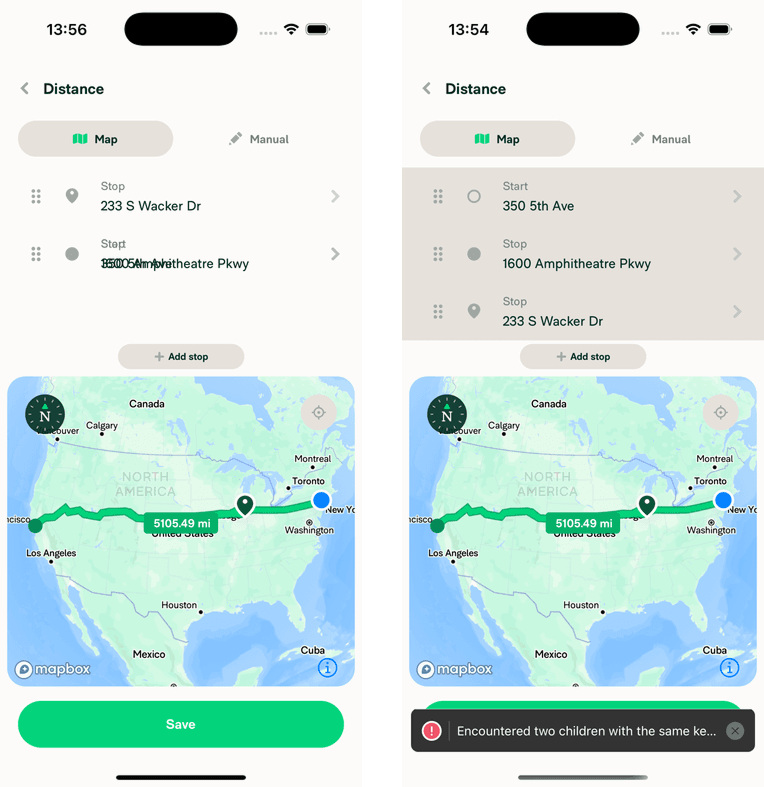
Conclusions and further improvements
What this experiment showed me is that I can rely on an agent to fully reproduce an issue without my involvement and to surface the underlying reason it is happening based on observed UI behavior and runtime signals.
Instead of manually watching the simulator or reconstructing steps, the report becomes the primary debugging interface. It already contains the final application state, key interactions, and evidence that allows both reproduction and interpretation of the root cause.
In practice, execution is no longer something I need to observe or guide. It is delegated end to end and later reviewed through a structured artifact.
Can we close the agent loop even more?
At this point, the process of reproducing and investigating issues is already heavily automated. The agent can take an issue, reproduce it end to end, and produce a structured report without any guidance during execution. The question is whether this can go even further? The answer is yes.
The next step could be connecting it directly to a code workspace. From there, the agent would not only reproduce the bug, but also attempt a fix on a dedicated branch, create a pull request, and validate the change by running the same reproduction flow again.
At that point, debugging stops being just about reporting and becomes a fully autonomous AI workflow, from finding an issue through fixing it to verifying the result.